Hideout
Deadlock on Linux and Steam Deck: setup, fixes and mods
How to run it through Proton, fix the crash when you join a match, and load mods on the current build.
Checked against Deadlock’s Nov 24, 2026 update6 min readLinux, Steam Deck
Yes. Deadlock has no Linux version, but Steam runs the Windows game through Proton on a Linux PC or a Steam Deck. Once a friend invites you to the playtest, install it and press Play. If it crashes when you join a match, check vm.max_map_count. For Deadlock mods on Linux, add three lines to gameinfo.gi. The single line some guides show stops the game at launch.
Run Deadlock on Linux with Proton
Get a playtest invite
Deadlock is still an invite-only playtest, and its Steam page lists Windows only. A friend who plays can send you an invite.
Install it and press Play
Steam runs Deadlock with Proton Experimental on its own, so you don’t need Lutris or a custom Proton build. Leave Properties › Compatibility alone unless something breaks.
Check vm.max_map_count
Run this in a terminal before your first match. If it prints 1048576 or more, you’re set. If it prints less, raise it as shown in the next section.
Terminal$ cat /proc/sys/vm/max_map_count 1048576
Fix crashes when you join a match
A low vm.max_map_count can crash Deadlock as it connects to a server. The kernel’s default is 65530, and Proton warns when the limit is under 1048576. On Proton’s Deadlock bug report, Valve’s kisak-valve gives raising it as the workaround.
Arch, Fedora 39 and later, and Ubuntu 24.04 and later already ship 1048576. If your limit is lower, these two commands raise it now and at every boot.
$ echo 'vm.max_map_count = 1048576' | sudo tee /etc/sysctl.d/80-deadlock.conf
$ sudo sysctl --system
The first command saves the setting in a file your system reads when it starts. The second loads it now. If the limit was already 1048576 or more and Deadlock still crashes, look at the next section instead.
If Deadlock won’t start under Proton
Under Proton, Deadlock uses DirectX 11, which Proton translates to Vulkan. The -vulkan launch option switches to the game’s own Vulkan renderer instead. If Deadlock won’t start or closes on launch, add it in Properties › General › Launch Options.
-vulkanReports on the Deadlock forum go both ways. -vulkan got the game going for some players, and others did better on DirectX 11. If it doesn’t help, clear the box.
Next, try another Proton version in Properties › Compatibility. If you see a box called Force the use of a specific Steam Play compatibility tool, tick it first. Pick a version from the list, and Steam downloads it. Try an older version as well as a newer one.
Deadlock on the Steam Deck
On SteamOS, Deadlock runs through Proton the same way it does on a Linux PC. SteamOS already sets vm.max_map_count far above 1048576, so you can skip that check. To reach the game’s files for mods, switch to Desktop Mode. Press the Steam button, then pick Power › Switch to Desktop. I haven’t tested mods on a Deck yet.
Find the Deadlock folder
In Steam, right-click Deadlock and pick Manage › Browse local files. Mods and gameinfo.gi are two folders down, in game/citadel. The full path depends on how you installed Steam.
# Default Steam folder
~/.local/share/Steam/steamapps/common/Deadlock

# Steam from the Debian or Ubuntu package
~/.steam/debian-installation/steamapps/common/Deadlock

# Steam from Flathub
~/.var/app/com.valvesoftware.Steam/.local/share/Steam/steamapps/common/Deadlock

# Steam from the Snap Store
~/snap/steam/common/.local/share/Steam/steamapps/common/Deadlock
A Steam library on another drive has its own steamapps/common/Deadlock. Steam’s Settings › Storage lists your libraries.
Install Deadlock mods on Linux by hand
Put the mods in addons
Deadlock mods are
.vpkfiles, and they go ingame/citadel/addons. Create the folder if it isn’t there. Name the files in lowercase, frompak01_dir.vpkup topak99_dir.vpk. When two mods change the same thing, the lower number wins.Add three lines to gameinfo.gi
The game reads
addonsonly whengameinfo.gilists it. Opengame/citadel/gameinfo.giin a text editor. InSearchPaths, add these lines right aboveGame citadel.game/citadel/gameinfo.gi+3−0Game_UILanguage citadel_*LANGUAGE*Game_LowViolence citadel_lvGame citadel/addonsMod citadelWrite citadelGame citadelGame core
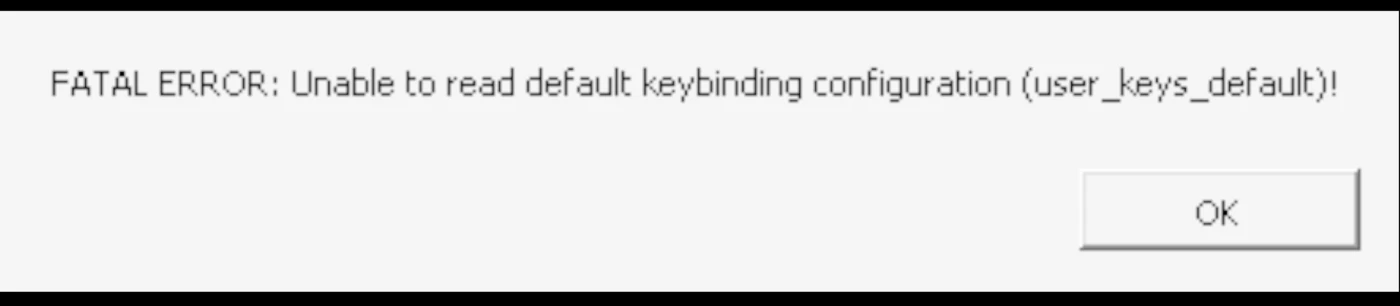
Some guides add only the first line. On the current build, that line alone makes Deadlock treat addons as its own folder. It writes its logs and shader cache there, looks there for its default key bindings, and stops at launch with the error below. The Mod and Write lines keep citadel as the game’s own folder.
Some game updates replace gameinfo.gi with Valve’s copy, and so does Properties › Installed Files › Verify integrity of game files. Mods stop loading until you add the lines again. If the game won’t start after an edit, Verify also gets you back to Valve’s file.
Play custom games with friends on Windows
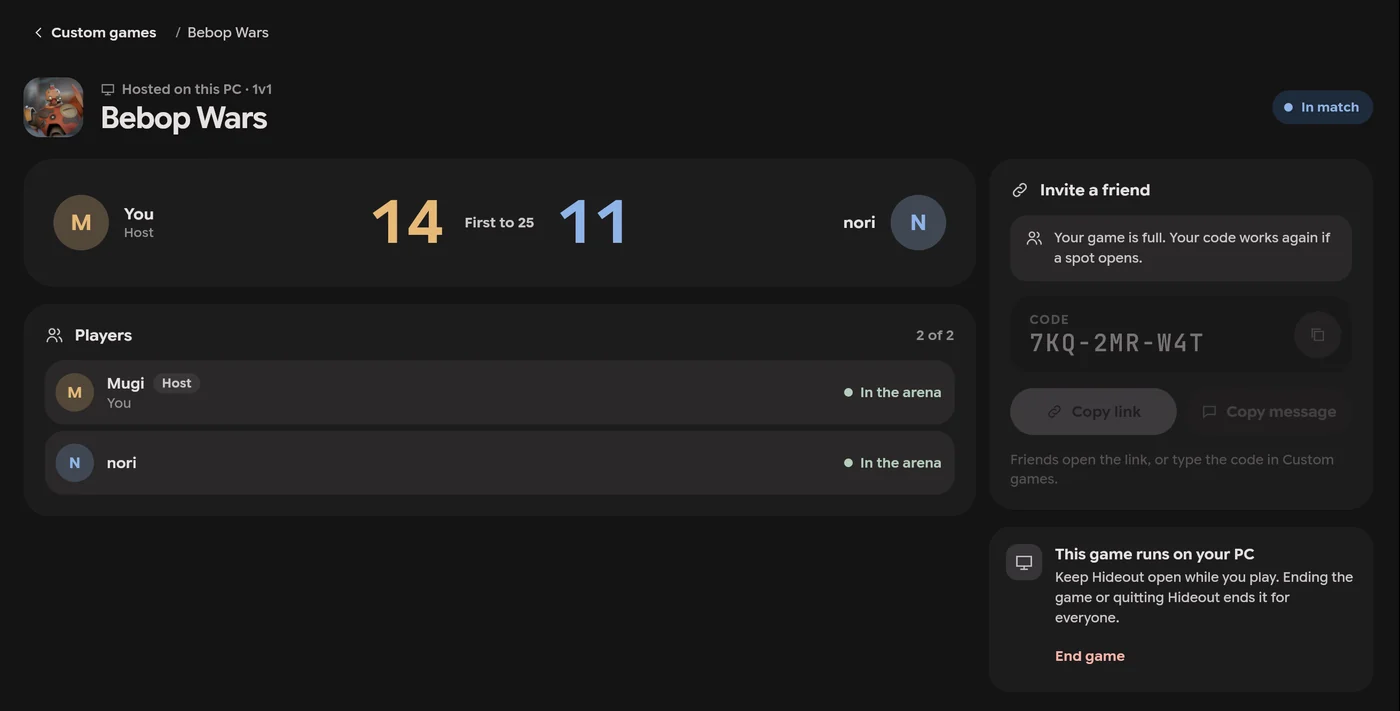
Hideout also runs community custom games inside Deadlock, like Bebop Wars. Linux and Windows players join the same games, and a Linux PC can host them.
If your Steam is the Flatpak or Snap, you can join a friend’s game but can’t host one yet. Hideout on Linux covers the AppImage and invite links.
Quick fixes
Find what you see on the left. Each fix links back to the section with the details.
| If you see… | Do this |
|---|---|
| Deadlock crashes when you join a match | If vm.max_map_count is under 1048576, raise it.Fix crashes |
| Deadlock won’t start | Add -vulkan to Launch Options, then try another Proton version.Won’t start |
| FATAL ERROR: Unable to read default keybinding configuration (user_keys_default)! | Add Mod citadel and Write citadel under Game citadel/addons in gameinfo.gi.Install mods |
| Mods don’t show up in the game | Check that gameinfo.gi still has the three lines, and that the files sit right in addons with names like pak01_dir.vpk.Install mods |
| Hideout can’t find Deadlock | In Hideout’s Settings › Game, press Choose folder and pick the Deadlock folder. Find the Deadlock folder |
| Hideout says “Hosting doesn’t work with this Steam yet” | Steam from Flatpak or Snap can join a friend’s game but can’t host yet. Custom games |
Questions
Does Deadlock work on Linux?
Yes, through Proton. ProtonDB, where players report how games run on Linux, rates it Gold from over 800 reports.
Will I get banned for playing Deadlock on Linux?
I found no reports of bans for playing on Linux, and anti-cheat trackers list Deadlock as working under Proton. I found no word from Valve either way. If Deadlock crashes under Proton mid-match, that still counts as leaving, and players report temporary matchmaking bans for it. Fix crashes before you queue.
Is Deadlock Steam Deck Verified?
No. Steam shows its Deck compatibility as Unknown, the rating for games Valve hasn’t tested yet.